For contributors
People with contributor access - your own cellar, ratings, notes, and wine additions
Last updated 25 August 2026
What this is
barberry.io started as one person's wine notebook and, for most of its life, that's exactly what it was - I wrote, you read. The plumbing is now there for you to keep a notebook of your own under the same roof: your cellar, your tasting notes, your scores, your analytics, all sitting alongside mine rather than mixed in with them.
This guide covers what you can do once you've been given contributor access. If you're reading it because you're curious - you're in the right place, but you'll also want the For readers guide first. That one explains what the site is and how to find your way around.
The three tiers
There are three ways to exist on the site, and each one is distinct:
- Reader — no account. Everything public (wines, producers, posts, events) is already accessible. Most visitors stop here.
- Registered account — free, self-serve at /register. Adds personal drafts, lets you be added to events you're invited to, opens up Telegram reminders and a linked profile. You can sign up without asking anyone.
- Contributor access — your own cellar, the ability to publish tasting notes, event hosting. Gated.
How to get contributor access
Contributor access isn't capacity-limited, it's feedback-limited. I'd rather grow this slowly with people who will actually tell me what's broken than fling the doors open and lose the signal. Two paths in:
- Take a membership. Contributor access comes with the Contributor and Patron tiers, and it unlocks the moment your subscription goes active - no waiting on me to flip a switch. See the membership tiers for the options.
- Drop me a line. boris@barberry.io with a sentence or two about what you'd want to use it for. The price of entry is your opinion: use it, break it, and tell me what's missing.
Once you're in, you'll see the same shell as before with a few more affordances unlocked - "Add bottle" on your cellar, "Add wine" in a few places, edit buttons on wines you can edit, your own analytics on the profile.
Your cellar
Your cellar lives at /profile/cellar. Adding a bottle is the main gesture. Every bottle carries three things worth remembering:
- The wine. Picked from the catalogue. If the wine isn't in the catalogue yet, you can add it from the same dialog without leaving what you're doing. See Adding wines below.
- The price. What you paid for this specific bottle, in whatever currency you paid in. This is per-bottle, not per-wine - the same Champagne bought in Kyiv and in Paris will happily carry two different prices.
- The location. Two levels. The primary is a categorical label you'll reuse a lot: "Home Cellar", "Kitchen rack", "Wine fridge", "Komora", whatever makes sense for your setup. The detail is the specific slot within it - "shelf 11", "top drawer", "case #3". Both are free text; the site doesn't try to be clever about what you mean. Pick conventions you'll stick to and your analytics will reward you. The primary location and source pickers remember what you've used before and list the frequent ones first (recent purchases break ties), so your usual answer is one tap away.
The fast paths
The Add bottle button offers three routes: pick from the catalogue, photograph the bottle, or snap the whole receipt (the photo routes come with the AI tools — see Identifying a wine from its label below). Whichever you take, the form pre-fills what it can — location and source from your most recent bottle, price from the wine's catalogue price when it's your first bottle of it — and anything you type wins over a default.
- Save & add another keeps the dialog open and carries the purchase context (date, currency, location, source) back to the picker. Five wines from one shopping run is one loop, not five separate flows.
- Photograph the bottle — the assistant reads the label and matches it to the catalogue. When the defaults cover every field, you get a one-tap confirm card instead of the form: the wine, a row of value chips, one button. Tap a chip to edit. Snap the invoice along with the label and the price, date, and quantity come straight off it.
- Snap a receipt — one photo of the whole receipt; every wine on it gets matched to the catalogue (by the shop's own SKU where we track it, by name otherwise). Review the checklist, adjust the shared date, source, and location, and add every bottle in one tap. Lines the catalogue doesn't know stay flagged — scan their labels afterwards, or add the wines first.
On a phone, the same actions live behind the [+] button in the bottom bar, wherever you are on the site.
Bulk intake: snap a whole wine run, review it later
Came home with 30 bottles? Don't scan them one by one. Bulk intake (the [+] button on a phone, or the Intake tab in your cellar) is a different rhythm: work bottle by bottle — photograph every side of the bottle in hand (front, back, importer sticker; the back label is where the good stuff hides), tap Next bottle, repeat. Toss in the receipt photo too if you have one, and hit submit. Photos you took earlier import from the gallery, with a grouping step to mark which shots show the same bottle. The upload happens straight from your phone, so even a big batch takes seconds of your attention.
Then walk away. The assistant works through the batch in the background: matching labels against the catalogue, drafting entries for wines the site doesn't know yet, matching receipt lines. When the whole batch is done you get a Telegram ping (toggleable in your notification settings) with a link to the review screen.
The review screen leads with the outcome, not the uploads. At the top, the receipt sits as a quiet reference block (shop, date, line count, the receipt's own total); its date, source, and currency are editable under "edit details". Below it, "adding to cellar" is one list of the wines that will actually land: one row per wine, with the resolved name, where it came from (a receipt line, your bottle photo, or both), the count, the price each, and the line total. Prices show in whole hryvnia. New wines carry a "new, pending" badge and go through the standard approval queue. At the bottom you type the location once (plus an optional sublocation for the exact slot; "it is somewhere else now" logs a transit move), check the grand total, and press a single confirm for the whole batch.
Everything the AI got wrong is fixable in place on the row: retype the quantity or the price, tap a quick "use ..." toggle to switch between the catalogue match and the create-from-bottle reading, or open "change wine" to search the whole catalogue. "Remove" leaves a row out this time (it stays reviewable later, under "not adding"). A row that still needs a decision, a wine or a price, blocks the confirm with a plain note instead of silently dropping out. Nothing is written until you confirm, and what the list shows is exactly what lands.
If you snapped both the receipt and the bottles, each bottle photo folds into its receipt line so the wine appears once, not twice: the receipt sets price and quantity, the photo rides along and becomes the wine's image. "Detach" splits a wrongly paired photo back out into its own row. When the catalogue doesn't have the vintage on the label yet (a fresh release the receipt could only match to an older year), the row does the right thing instead of filing a 2021 under 2020: it reads "create ... (new, pending)" and confirming mints the correct wine from the bottle's own reading, then adds the receipt's bottles to that. A brand-new producer bought as several cuvees on one run lands once, not per line: the first wine creates it and the rest of the batch reuses it. Confirming again after an error is safe, too: if a confirm trips halfway (say the new wine landed but its bottles did not), the retry picks the created wine back up instead of minting a duplicate. And if the assistant misreads a bottle and can't place it on the receipt, that bottle shows up as its own row that says so, with "link to a receipt line": pick the line it belongs to and it folds in, creating the right wine and inheriting that line's count and price instead of landing as a lone bottle at no price.
Photos still processing sit in a strip above the list and turn into rows as they finish (the page keeps itself current). Failed ones show why, with retry and dismiss right there; a blurry photo costs nothing. Bottles with no receipt at all (a gift, a photo-only run) sit in the same list as their own rows: count 1, price you type, same shared details. A batch you submitted by mistake can still be cancelled while it's queued.
Browsing and filtering
The cellar view defaults to a grid of bottle images. Switch to a table if you prefer dense rows. Filters across the top narrow by origin, grape, producer, colour, type, sweetness, fortification (when applicable), importer, price range, and location. The location filter folds sub-locations under each primary: expand a location to tick a single box or shelf, or pick the primary itself to cover all of them, and use the search field at the top of the dropdown when the list grows long. The main search box also matches storage locations, so typing "komora box 7" finds whatever lives in that box. Sort by name, vintage, price, rating, quantity. ⌘K also searches across your cellar alongside everything else.
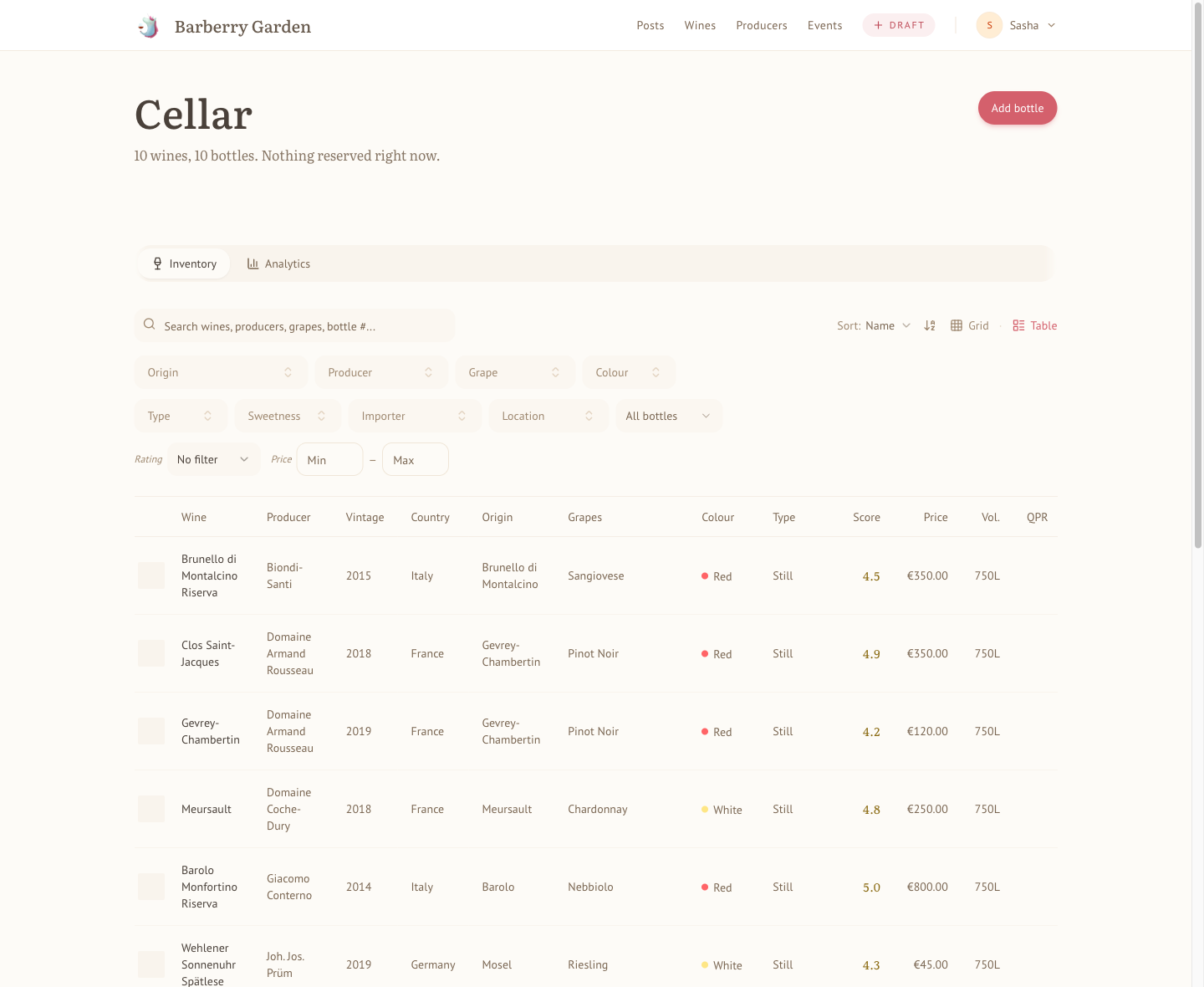
The table view: every bottle with its producer, vintage, origin, score, price, and quality-to-price ratio, all filterable and sortable.
Bottles on the wine's page
Every wine you own shows a Your Cellar table on its own detail page — one row per bottle you have (or had) of that wine, with its status (available or consumed
Priced bottles also carry a your QPR note next to the price: the wine's quality-to-price ratio re-based on what you actually paid rather than the market price. Pay 20% under retail for a fairly-priced wine and your bottle quietly crosses into good-deal territory — the note takes colour (and names the band) only when your price moves the bottle into a different band than the wine's own verdict, so an ordinary shop discount stays grey. Free and gifted bottles show nothing: a free bottle isn't an infinite gem, it's just not a purchase.
Consuming a bottle
When you open a bottle, click Consume. You'll be asked for a score (optional), a tasting note (optional), a date (defaults to today), and a venue. If the bottle is reserved for an event, the event gets attached automatically. The bottle leaves your inventory; the rating lives on the wine's page. If you consumed by accident, there's an undo.
Buying a wine again
If you've bought a wine before, the Add Bottle dialog shows your previous purchases of it as tappable chips - price, source, and location, with a count and the last purchase date. Tap one and the form fills itself; only the purchase date stays at today (it's a new purchase) and the USD price re-converts at today's rate. These suggestions come strictly from your own cellar - nobody else's purchases, and nobody sees yours.
Batch operations
Adding ten bottles of the same wine? The dialog has a quantity field. Each bottle gets its own ID, its own location slot, and its own price if you want to differ them. Consuming a batch gives you one dialog that creates one rating and decrements the count by one.
Reservations
Bottles can be reserved for an upcoming event you've signed up for. A reserved bottle stays in your cellar count but is marked unavailable so you don't accidentally drink it on a Tuesday night.
Rating wines and writing tasting notes
The rating is the short end. The note is the long end. Both end up on the wine's detail page under your name, dated, stamped with the venue or event if there was one.
What a rating looks like
Scores here are personal - the five-point scale with two decimals described in the For readers guide. You can leave a rating without a note or a note without a score, though the most useful ratings carry both. A favourite flag (the heart) is separate from the score - it captures "I would recognise this anywhere and I want to remember that I loved it" rather than an absolute number.
Privacy
Every rating carries one of three states: draft, private, or public.
- Draft — only you can read it. Not other participants, not the admin, nobody. Drafts are working thoughts: they stay yours until you say otherwise. Notes typed during a live event start as drafts; so do notes captured on the fly via /drafts/new; so do the blind ones you write before you know what you're drinking.
- Private — only you (and the admin, for reasons of database physics — see the admin-side note below) can read it. This is the default for ad-hoc ratings written outside an event. "Honestly" sometimes means unflattering things about wines your friends brought to dinner; the site protects that by default.
- Public — visible on the wine page, the recent tastings list, event reports. Available to contributors with co-author capability.
Capturing a draft in the moment
Three paths land in the drafts inbox, each for a different rhythm:
- /drafts/new — the "+ Draft" button in the nav (or Quick note behind the [+] in the phone bottom bar) is the fastest way in. Tapping it creates a blank draft and drops you straight into the focused editor with the keyboard ready; no wine picker to answer first, no "Save" button to hunt for. Start typing, tap a score, identify the wine when you're ready. Everything saves to the server as you go — and if the connection drops mid-dinner, your keystrokes also stay on the device and sync the next time the draft opens. Think of drafts as an inbox for fleeting notes — figure out specifics (what, with whom, where) later.
- Live event page. Still the right place when you're inside a hosted tasting — score + note get attached to the event automatically, and your score feeds the live scoreboard. If the pour is a blind wine, the draft it creates keeps the paper bag on everywhere: your drafts inbox shows it under its blind label ("Wine B", not the real name) until the host reveals it. No peeking at your own inbox mid-flight.
- Wine detail page. Write a full rating straight to private/public from the wine's own page when you already know exactly what you're reviewing and don't need a draft stop along the way.
The note editor on all three surfaces supports GitHub-flavoured markdown. Type [ inside a note to search for and link another wine, post, or producer; paste or drop an image to upload it inline.
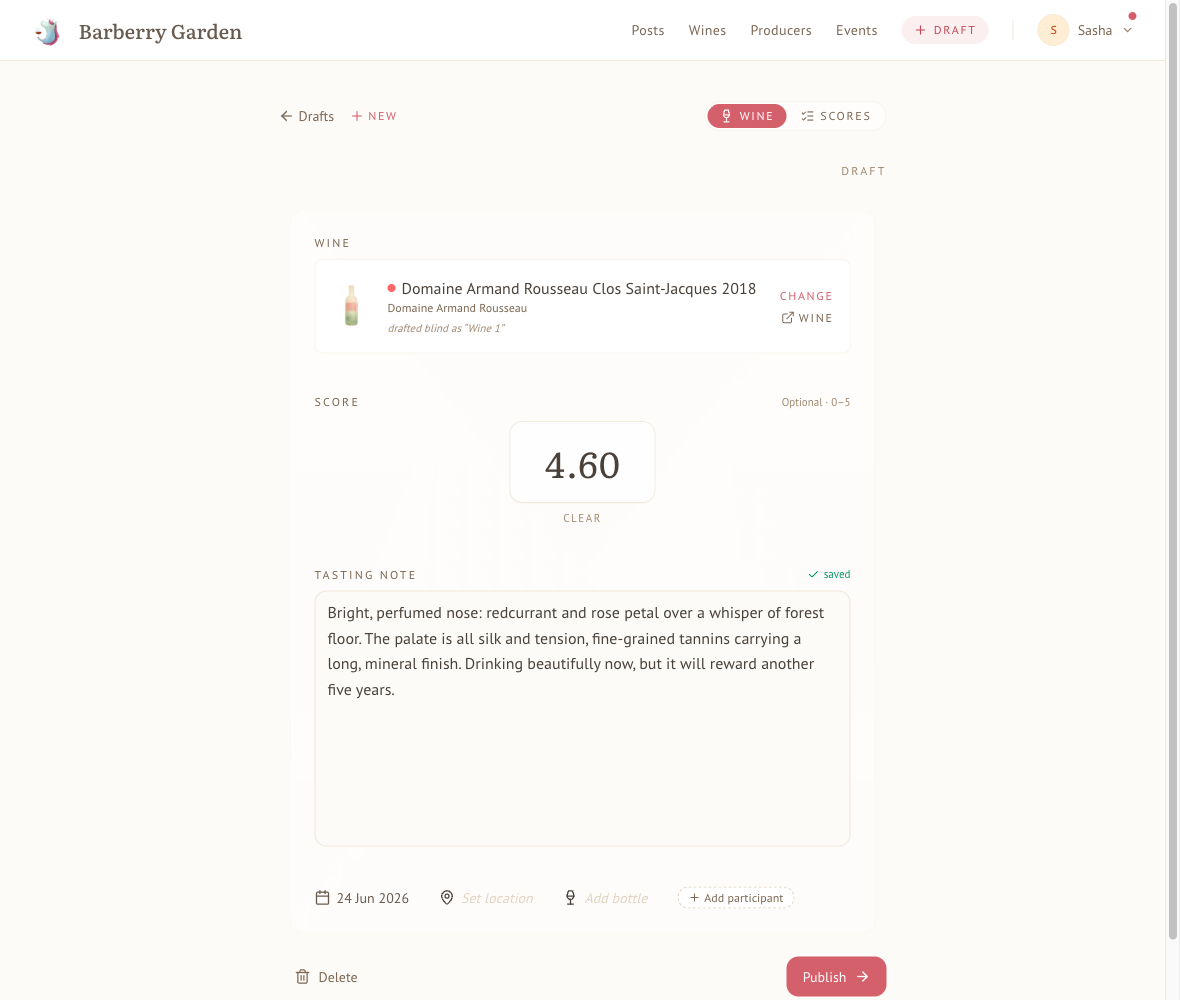
The focused editor: identify the wine, tap a score, write the note. Everything saves to the server as you go; the blind label it started as is kept as a footnote.
Place, people, and a bottle
Under the note, a quiet row records the context: when (the tasting date, defaulting to today — tap it to correct a note written up after the fact), where (a venue, a host's home, or just typed-in text), who you tasted with (recently co-tasted people surface first; invent a guest on the spot if they're new), and — once the wine is identified — which bottle it was. The whole row autosaves; there's no Save button.
When you're working through several wines in one sitting, a fresh draft offers a one-tap Same as ... shortcut: if an earlier draft from the same day already has a place and people, tap Use to copy both across. It only shows while the new draft's location and participants are still empty, and quietly steps aside once the draft has context of its own.
The bottle picker ties a draft to a specific bottle from your cellar — linking it marks that bottle consumed, the same as drinking it from the cellar view. Don't have it on the shelf yet? Pick Acquire a new bottle to record one (price, location, source) without leaving the draft; the new bottle is linked automatically. Blind drafts don't show the bottle picker until the wine is identified.
Blind drafts
A draft without a wine is fine. Flip Blind — identify later on the new-draft screen; the wine slot becomes a short label ("Wine 1", "the funky orange") so multiple blind drafts in one session stay distinguishable. Everything else about a blind draft behaves normally — score, note, autosave to the server — except it can't be published. The Publish button flips to Identify to publish until you pick the real wine. Once identified, the blind label is quietly preserved as historical context under the wine name on the draft ("drafted blind as 'Wine 2'").
Identifying a wine from its label (preview)
The AI identify tools come with a Contributor or Patron membership (an admin can also switch them on for someone individually). With them, you have two new entry points. From the command palette (cmd/ctrl-K), pick Snap a label to capture or upload up to four photos of a bottle's labels — front, back, capsule, importer sticker, whatever's legible. The assistant reads them, looks up matches in the catalog, and offers one of:
- In the archive — the wine is already here. Open it, or start a draft on it.
- A few possibilities — pick which catalog wine matches, or skip and keep the draft blind.
- New to the archive — saves a blind draft with the assistant's best read of the label so the inbox card isn't just "Wine 1". Adding the wine to the catalog properly is a separate slice (coming soon).
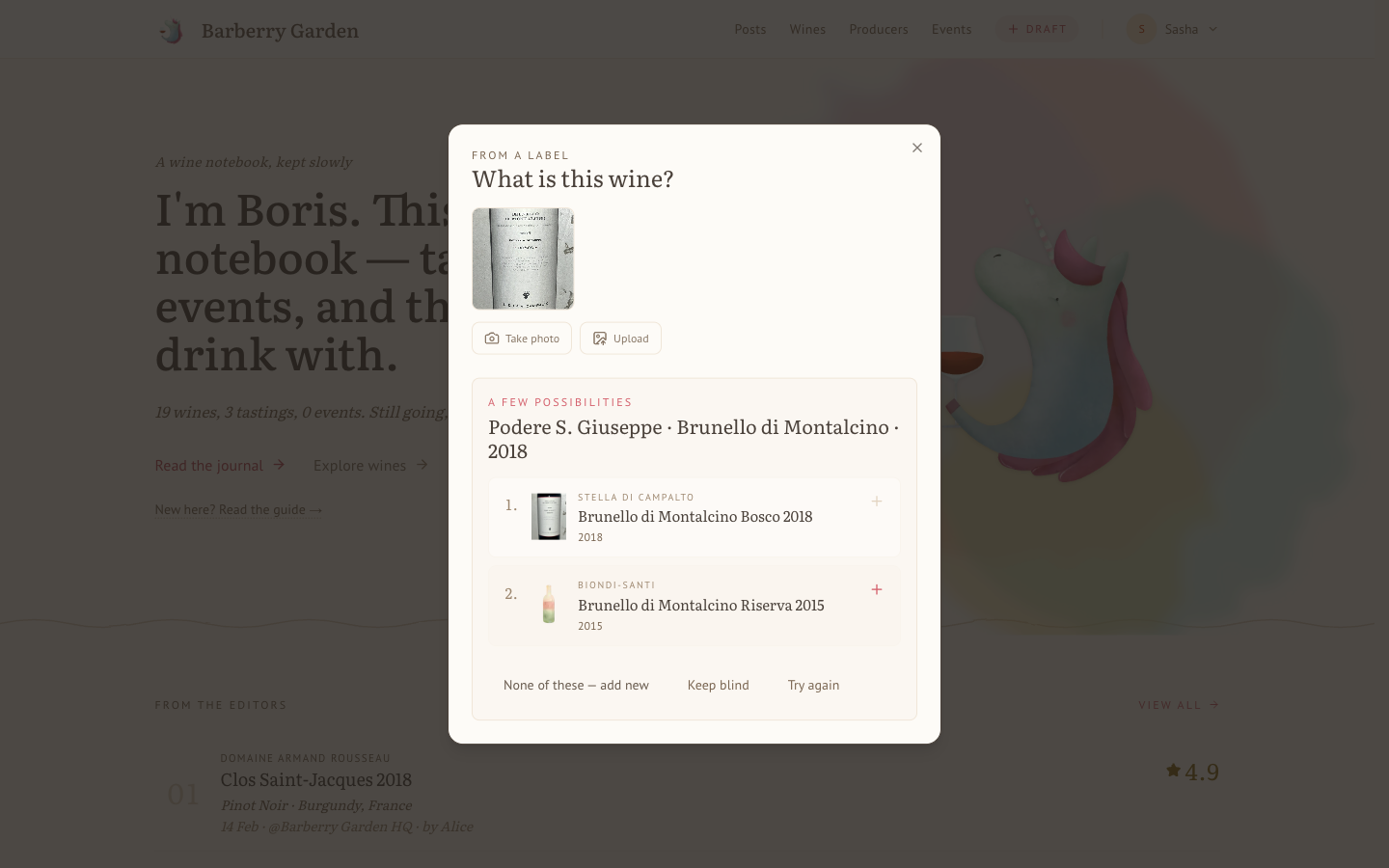
The assistant read this Stella di Campalto label (down to the estate name on it) and surfaced the closest catalogue matches, the right wine first.
The second entry point is on a blind draft itself: alongside the existing Identify button (catalog search) you'll see From photo. Same flow, but it rewrites the current draft instead of creating a new one.
Both photo entries come with a Contributor or Patron membership (an admin can also enable them for someone individually). They're still in preview, so we'd love your feedback on them.
The drafts inbox
/profile/drafts is the single list of every unpublished note you own. A red dot on your avatar (and on the Drafts menu item inside) tells you when the pile isn't empty. Opening a solo draft lands you in a focused editor at /drafts/[id] — swipe or arrow-key to slide between drafts without going back to the list. From there, publish, delete, change the wine, or identify a blind one — all inline. Event-linked drafts are marked with a small "event" pill and route straight to the event's live page with the wine preselected; score and sentiment live with the event, not the drafts surface.
Publishing a draft
When a draft is ready, Publish moves it out. Same affordance appears in four places, each for a different moment:
- Live event, My Scores tab. Per-row Publish → next to each draft note — quickest when you're still at the table and the notes are fresh.
- Drafts inbox at
/profile/drafts. A row-level Publish → for when you're triaging the pile. Only appears on solo drafts — event-linked drafts publish through the event. - Focused draft editor at
/drafts/[id]. The primary action at the bottom of the slide, next to Delete. - Wine detail page. Inline on the rating's meta row when you're looking at your own draft. Good for polishing a week later.
Publishing lands on whichever visibility your default_rating_visibility is set to — private if you're a contributor, typically public if you're a co-author. It's one-way: there's no un-publish to draft. If you want to retract a published note, flip it to private via the wine-page edit form instead.
Event drafts also promote automatically when the host wraps up the tasting - either by clicking Finalize Scores or by settling the event's finances, whichever comes first. Each participant's drafts (notes and score-only entries) move into their notebook so nothing stays stranded in the drafts pile. The target visibility is a separate preference: Account → Publishing → "Visibility for event drafts". The default is private — your event impressions stay personal unless you explicitly opt them into the public timeline. Co-authors who'd rather have event drafts follow their general default can set the preference to Same as default. Reopening scoring later only unlocks the score field; already-promoted notes keep their visibility.
Editing
You can edit or delete your own ratings from the wine's page. Edits don't leave a visible audit trail, but they do update timestamps, so if you've revised a score three months later the date reflects the revision.
Adding wines the site doesn't know about
If the wine you want to add a bottle of isn't in the catalogue, use Add wine - either from the link next to the cellar header or from the "Add a new wine" option inside the Add Bottle dialog.
The form asks for:
- Producer - picker with type-ahead. The list includes producers you added that are still waiting for approval, so a second wine from the same new estate attaches to the same entry instead of creating a duplicate. Typed names match ignoring case and accents. If the producer isn't in the catalogue at all, type a new name and pick "Create".
- Name and vintage. Vintage is optional for NV wines.
- Beverage. Wine (the default) or sake. The catalogue holds both, and sake reuses the same machinery - ratings, cellar, events. Picking sake swaps the wine-only fields below for two of its own: the grade as printed on the label (junmai, junmai-ginjo, daiginjo, ...) and the polishing ratio (seimaibuai - the percent of the rice grain remaining after milling). Fortification doesn't apply to sake.
- Colour, carbonation, sweetness. Single-select chips.
- Fortification. None / Fortified / Mistelle / Aromatised. For Madeira, Port, Sherry, vermouth, Barolo Chinato, and similar. Picking anything other than None reveals an optional cask age field underneath.
- Bottling date and release label. Optional, available for any wine. Use them when a non-vintage release is identified by something other than a year: a bottling date off the back label, or a lot code like "L16372/05/23" on a grower Champagne or Sekt. "Lote 2" style release names go in the same field.
- Grapes. Multi-select with synonyms - "Spätburgunder" surfaces Pinot Noir, "Tokay" surfaces Pinot Gris. If you pick a synonym the catalogue stores the canonical name.
- Origin. A country/region/appellation tree. Pick at whatever depth you know - "France" is fine if that's all you have.
- Alcohol, volume.
New wines go through a light approval queue. The queue mostly exists to stop the same Chardonnay being added eleven times with eleven different spellings. In practice most entries pass through in a day or two. Once approved, the wine appears in the public catalogue and can be rated by anyone who's had it.
From a photo (the assistant pre-fills it)
With a Contributor or Patron membership (or an individual admin grant), Pre-fill from photo sits at the top of the Add wine form. Snap or upload the front and back labels and the assistant reads what it can, the producer, name, vintage, colour, grapes, and origin, and drops it into the form along with a short note on what it inferred and what it couldn't see. Nothing is saved automatically: you review and correct every field, then submit to the same approval queue as a hand-typed wine.
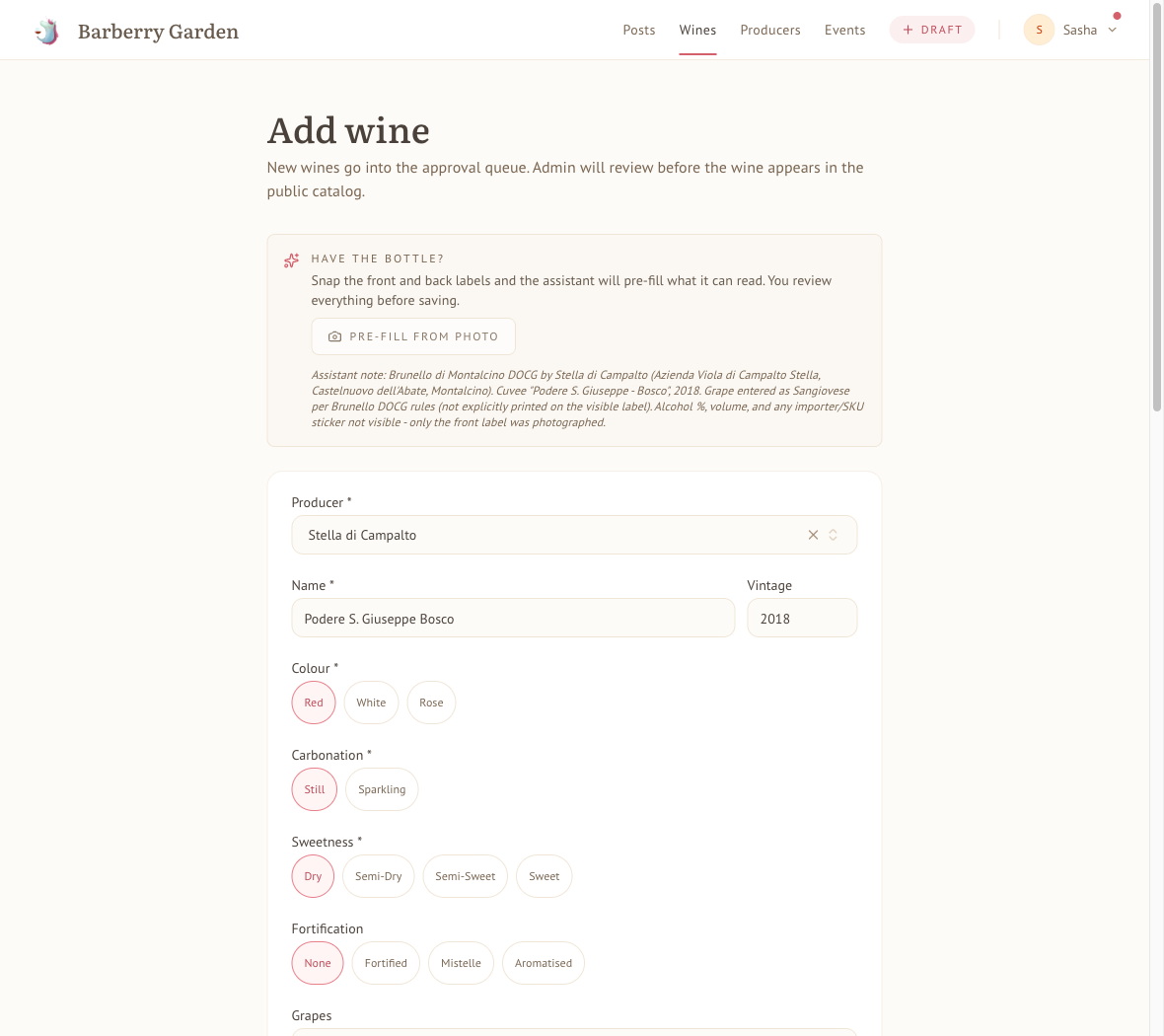
The assistant read this Stella di Campalto label and filled the form, leaving a note on what it inferred (the grape, per DOCG rules) and what the single photo did not show.
The photo tools are wine-only for now: a sake label gets politely declined, so add sake through the form by hand.
Editing producers directly
The inline "Create" path on the Add wine form is the fastest way to add a producer you just need for a single bottle. For anything more - a full write-up, country and region links, correcting an existing entry - use Add producer from the Producers page, or the "Edit producer" link on a producer's page (visible on your own non-approved entries, and on everything if you're an admin).
The producer form asks for the display name, a short description (shown in listings and meta), one or more countries, one or more regions, and a long-form markdown write-up. Producers created this way follow the same approval queue as wines.
Wine runs
With a Contributor or Patron membership (or an individual admin grant), /profile/wine-runs is where you plan what to buy. A run is a shopping list for a batch: an event, an offsite, a friend's order. Add wines (or free-text lines), set quantities, and the run tracks the list price, the discount you get, the actual price after it, and the line total, grouped by shop so you know what to buy where. Tick bottles off as they arrive; the header keeps a running spend, savings, and progress. Wishlists sit alongside, for wines you want but haven't slotted into a run yet.
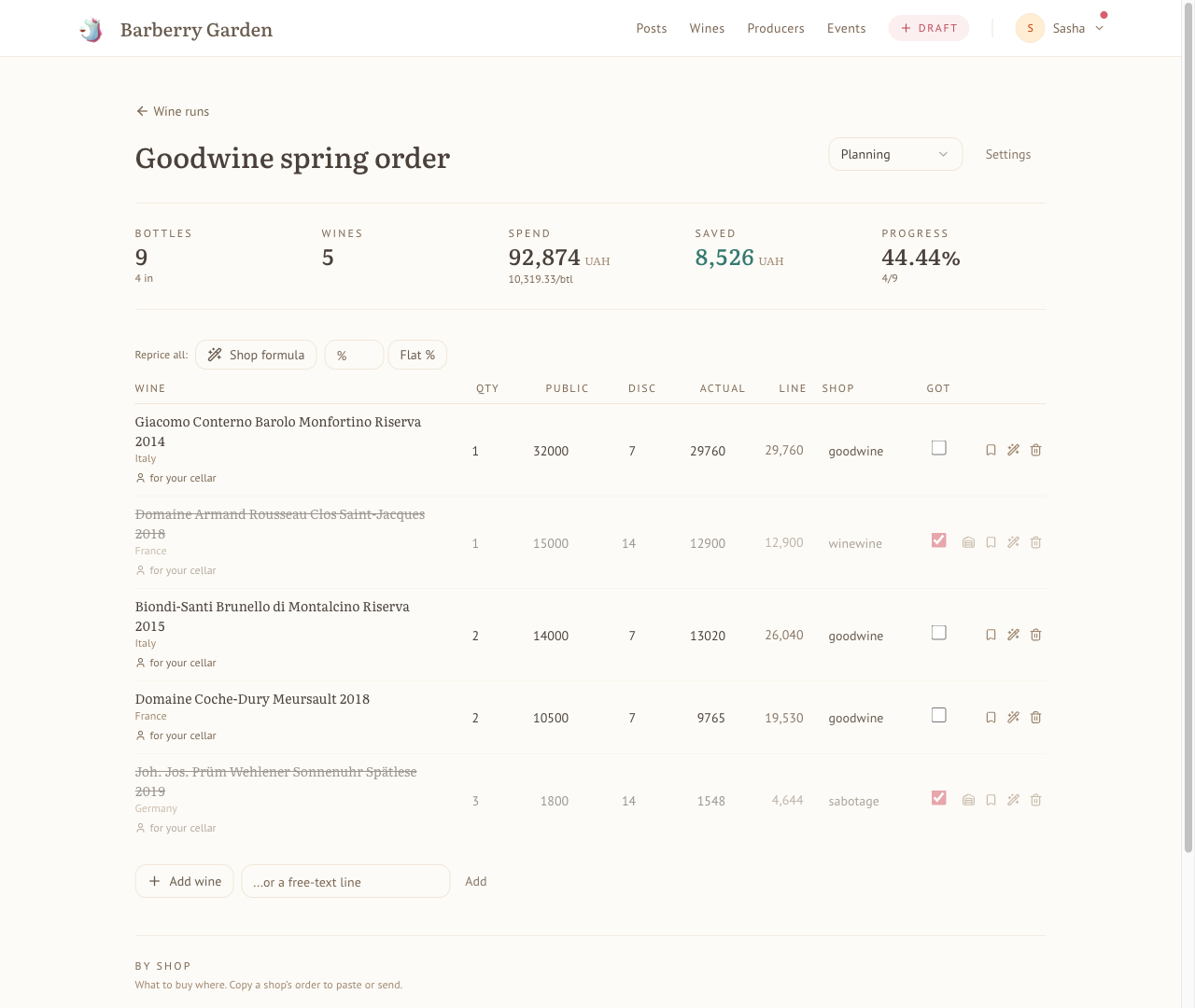
Planning a batch: list price, discount, and real cost per line, with savings and pick-up progress tracked across shops.
The Wine runs guide covers the pricing model, shop discount formulas, and wishlists in full.
Your pages
Your own pages live under /profile. The avatar in the top-right is the fastest way in. The top of /profile gives you an editorial overview - upcoming events, stats, top-rated wines, activity, consumption trends, favourite venues, recent events, latest wines.
Tabs along the top take you to the individual views:
- Wines - every wine you've tasted, with filters that mirror the main catalogue.
- Events - events you've been to or signed up for.
- Analytics - deeper charts: rating distributions, vintage histograms, grape breakdowns, compatibility with other convives.
- Ledger - event charges, settlements, top-ups, running balance.
Cellar analytics
/profile/cellar/analytics is a separate view from the analytics tab above, because the data is different. It answers questions like: how much am I spending per year, what do I have too much of, what's been sitting there untouched, what's my most-represented country, how does the cellar's value distribute across locations. Because every bottle carries a real price and a real location, the charts mean something.
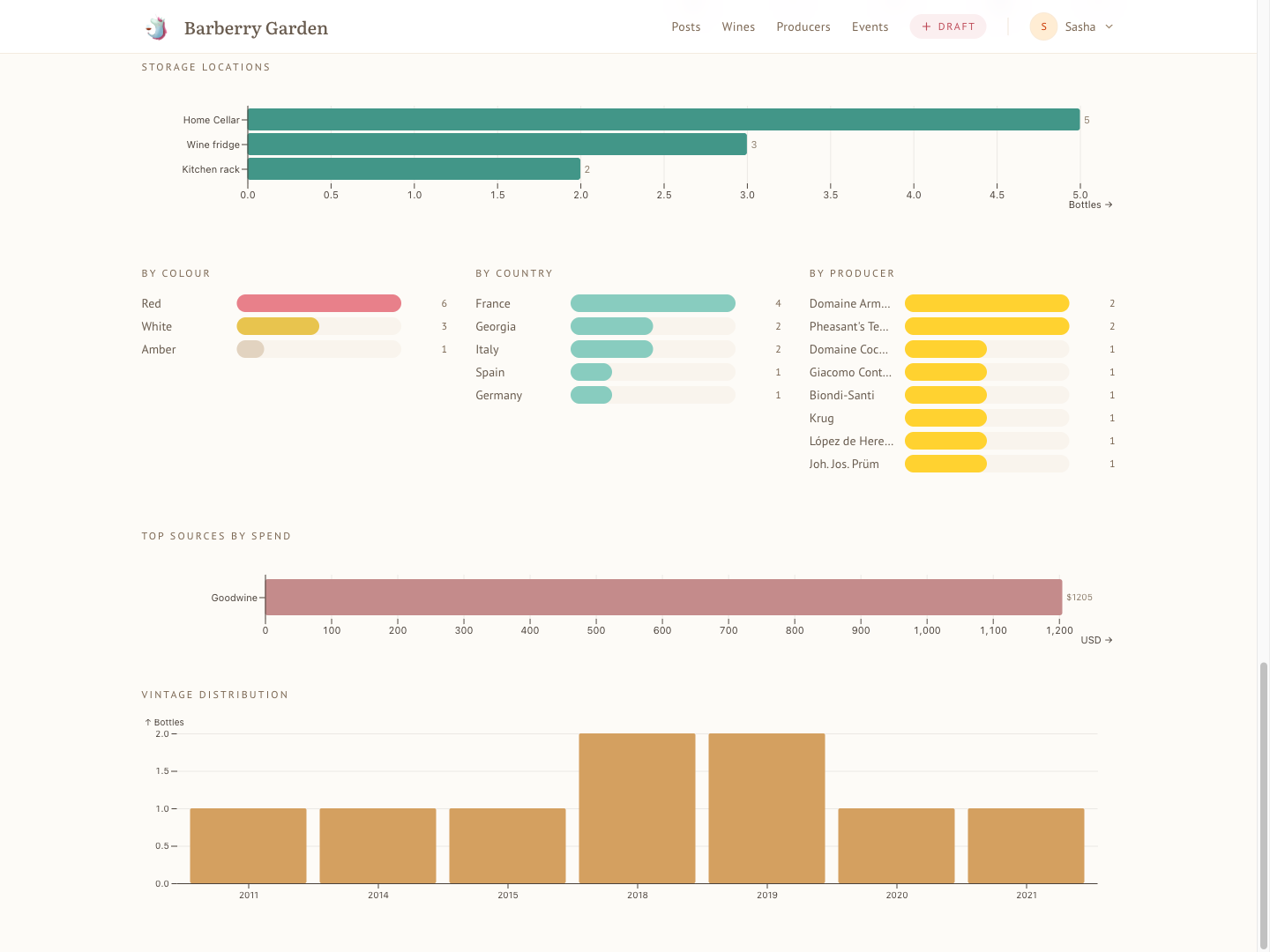
Where your money actually sits: by storage location, colour, country, producer, shop, and vintage.
The storage locations chart counts bottles per primary location. If you also fill in the location detail ("shelf 11", "case #3"), any location with more than one distinct detail gets a Show sub-locations toggle under the chart that breaks its count down per slot.
What's private, what's visible, what you'll see on event reports
Short version:
- Your cellar. Private. Only you see it.
- Your tasting notes and ratings. Drafts are author-only until you publish; private ratings are visible to you and the admin; public ratings show up on the wine page and recent-tastings list. If a rating is attached to an event you attended, your score shows up on the event report next to your name — the note doesn't unless you've published it.
- Your profile overview, stats, analytics. Private. Visible only to you.
- Your name and avatar. Public — they appear on event reports, wine pages (under co-tasters), and in any event you're signed up for.
- Wines you add to the catalogue. Public once approved. The catalogue belongs to everyone; the notes about it belong to their authors.
- Your ledger. Private. Only you and the admin can see it (settlement requires it).
A note on the admin side
I'm the admin. The database is mine, which means — technically — I could look at anything in it. I don't, and more concretely: I've deliberately chosen not to build any admin UI that would let me see what's in another convive's cellar, or read private tasting notes, or browse anyone's personal pages beyond what the ordinary views allow. Drafts go one step further: the read policy in the database itself excludes drafts from any query that isn't the author's, so even I don't see them through any view. The temptation isn't so much resisted as removed at the root.
There are two reasons. The first is the obvious one: your cellar and notes are yours. The second is more selfish — we drink together, and I want to be surprised when someone pulls a blind bottle out of a bag. A cellar I've already snooped at isn't a blind tasting, it's a guessing game with an unfair advantage.
The one exception is the ledger, which I have to be able to see in order to settle with you after events. Everything else stays behind a door I haven't built a key for.
What's coming
Two things I'm building but haven't opened up yet:
- Hosts. Trusted contributors will be able to host their own tastings on the site - create events, manage signups, settle up through their own ledger.
- Live rating during events. Scoring a wine on your phone while it's being poured, rather than the morning after. Works internally. Not public yet.
Both will get their own sections in this guide when they ship. This page will stay current with what the site actually does.
Get in touch
Questions, bugs, feature requests, strong opinions about the default visibility of tasting notes - send them to boris@barberry.io or find me on Telegram. The whole point of contributor access right now is that you have the signal and I don't.